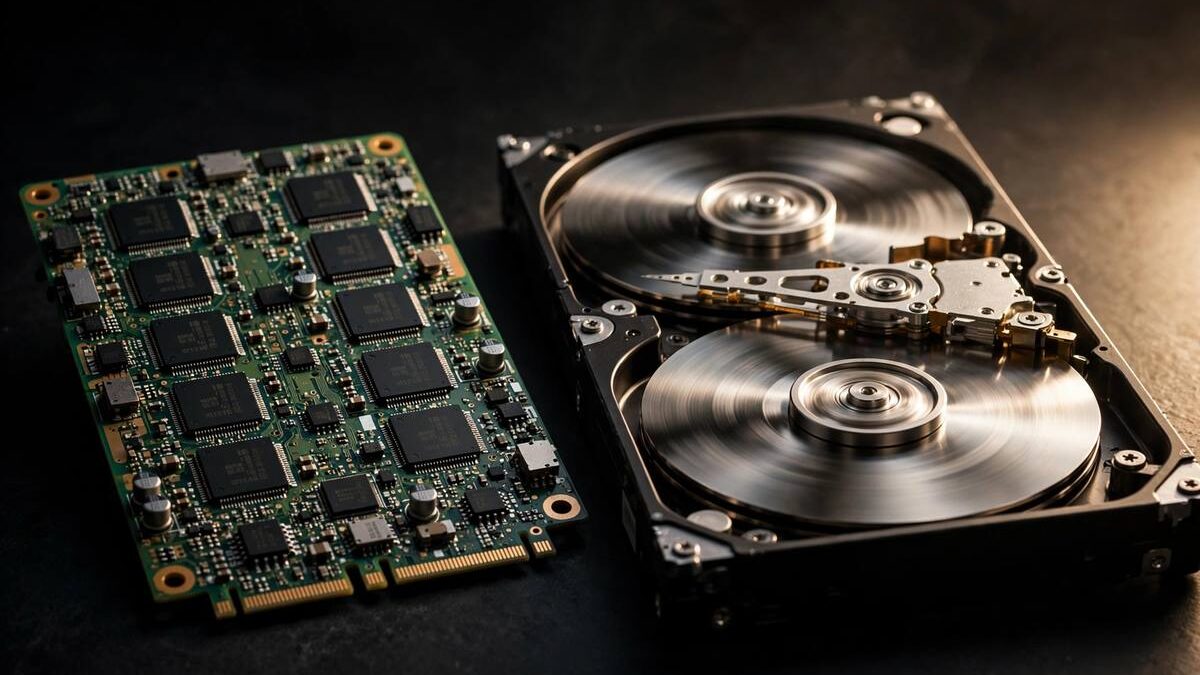
When hosts advertise their plans, one specification appears again and again: SSD storage. But does SSD hosting actually make your website faster than old-fashioned HDD hosting, or is it just marketing? The short answer is that storage type genuinely affects performance — though how much it matters depends on what your site does.
Every time a visitor loads your page, the server reads files and database records from its disks. The speed of those reads sets a floor for how fast your site can respond. In this guide we explain how SSDs and HDDs differ, where the speed gap shows up most, and whether paying extra for SSD hosting is worth it in 2026.
- How SSDs and HDDs Differ
- Where SSD Speed Matters Most
- Reliability and Lifespan Compared
- What SSD Hosting Costs
- NVMe: The Next Step Beyond SSD
- Should You Choose SSD Hosting?
How SSDs and HDDs Differ
A traditional hard disk drive (HDD) stores data on spinning magnetic platters, with a mechanical arm that physically moves to read each piece of data. That movement takes time — typically several milliseconds per read. A solid-state drive (SSD) has no moving parts; it stores data in flash memory chips and retrieves it electronically, in a fraction of a millisecond.
The practical result is that SSDs read and write data many times faster than HDDs, especially for the small, random reads that websites constantly perform. Loading a WordPress page might require dozens of separate database queries and file reads; on an HDD, each one waits for the mechanical arm, and those milliseconds add up. On an SSD, they complete almost instantly.
There is also a latency advantage under load. When many visitors hit a site simultaneously, an HDD’s mechanical head becomes a bottleneck as it thrashes between requests. SSDs handle concurrent reads gracefully, which is why shared hosting servers — where hundreds of sites compete for disk access — benefit enormously from solid-state storage.
Where SSD Speed Matters Most
The speed gap is most dramatic for database-heavy sites: WordPress blogs, forums, e-commerce stores, and membership sites that query a database on nearly every page load. For these, moving from HDD to SSD hosting can cut page generation times significantly — sometimes by half or more. Visitors feel the difference as snappier page loads.
It also matters for server response under traffic spikes. When a post goes viral or a sale begins, the server must serve many simultaneous requests, each needing disk reads. SSDs absorb this burst far better than spinning disks, reducing the chance that your site slows to a crawl at the worst moment.
Where does it matter less? For mostly static sites with aggressive caching, pages are served from memory and rarely touch the disk, so storage speed fades into the background. And no storage upgrade fixes a slow site caused by bloated themes or unoptimized images — speeding up a WordPress site usually starts with those fixes before hardware. If your pages still feel sluggish after optimizing, try testing your internet speed to confirm the bottleneck is really the server and not your own connection.
Reliability and Lifespan Compared
Speed is not the only advantage. Because SSDs have no moving parts, they are immune to the mechanical failures that kill hard drives: worn bearings, head crashes, and vibration damage. In the vibration-prone environment of a busy server rack, that ruggedness translates into fewer disk failures and less unexpected downtime.
SSDs do wear out differently — flash memory cells degrade slightly with each write — but modern drives include wear-leveling and over-provisioning that give them lifespans far beyond typical server replacement cycles. For hosting purposes, a quality SSD is at least as reliable as an HDD, and usually more so.
There is a practical upshot for your data: hosts using SSDs can rebuild failed arrays and restore from backups faster, since every read and write operation during recovery runs at SSD speed. Faster recovery means shorter outages when something does go wrong. The same principle applies to your own hardware — upgrading an old laptop with an SSD is famously the single most effective speed boost for aging computers.
What SSD Hosting Costs
A decade ago, SSD hosting commanded a hefty premium because flash storage was expensive per gigabyte. That gap has largely closed. SSD prices have fallen dramatically, and today most reputable shared and VPS hosts include SSD storage as standard at no extra cost — it is simply what modern hosting uses.
You should now treat HDD-only hosting as a warning sign rather than a bargain. A host still selling spinning-disk shared hosting in 2026 is likely cutting corners elsewhere too, from server software to support staffing. The rare exception is bulk storage: some hosts offer large HDD-based storage add-ons for archives and backups, where capacity matters more than speed.
When comparing plans, check whether the host specifies SSD, NVMe, or nothing at all. “SSD” is the baseline expectation; silence on storage type deserves a pre-sales question. Price differences between hosts today reflect support quality, features, and resource limits far more than the cost of the drives themselves.
NVMe: The Next Step Beyond SSD
Just as SSDs replaced HDDs, a newer technology called NVMe is replacing older SATA-based SSDs in premium hosting. NVMe drives connect directly to the server’s fastest data lanes instead of going through interfaces designed for spinning disks, delivering several times the throughput of a standard SSD.
For most websites, the jump from HDD to SSD is transformative while the jump from SSD to NVMe is incremental — noticeable in benchmarks, modest in real-world page loads. It matters most for extremely database-intensive applications and high-traffic stores where every millisecond of query time counts.
Some hosts now advertise NVMe storage as a differentiator, and it is a legitimate one, though rarely a reason to choose an otherwise inferior host. Think of the progression as good (SSD), better (NVMe), and obsolete (HDD) — and make sure you are at least at “good.”
Should You Choose SSD Hosting?
Yes — in 2026, SSD hosting should be considered the minimum standard, not a luxury upgrade. The performance, reliability, and concurrency benefits are real and well-documented, and the price premium has effectively vanished. There is no good reason to put a new website on spinning disks.
That said, keep storage in perspective. SSD hosting raises your performance floor, but your site’s actual speed still depends on optimization: caching, image compression, lean themes, and a nearby server location often matter more than the drive type. The fastest storage in the world cannot compensate for a five-megabyte hero image.
When shopping, confirm SSD or NVMe storage, then move on to the factors that differentiate hosts today: uptime record, support quality, backup policies, and honest pricing. For a broader look at the infrastructure that delivers your pages, Cloudflare’s learning center explains storage, caching, and networks in plain language.